Modern R Package Development (Advent Calendar 2025)
Modern R package development
R package development can feel overwhelming… Documentation, testing, CI/CD, and CRAN submission, there are dozens of tools to learn!
What’s Changed?
The R ecosystem has evolved dramatically. Tools like usethis, pkgdown, and GitHub Actions have automated what used to be manual, error-prone work.
What You’ll Learn?
- Automated setup and infrastructure
- Beautiful, maintainable documentation
- Comprehensive testing strategies
- Advanced features and CRAN submission
Who is this for?
- First-time package developers starting fresh
- Experienced devs wanting to modernize their workflow
- Anyone who’s struggled with CRAN submission
- Teams establishing package development standards

usethis - Project Setup Automation
Automating repetitive package development tasks!
This package automates ALL the boilerplate
It enforces best practices that the R community has learned over decades
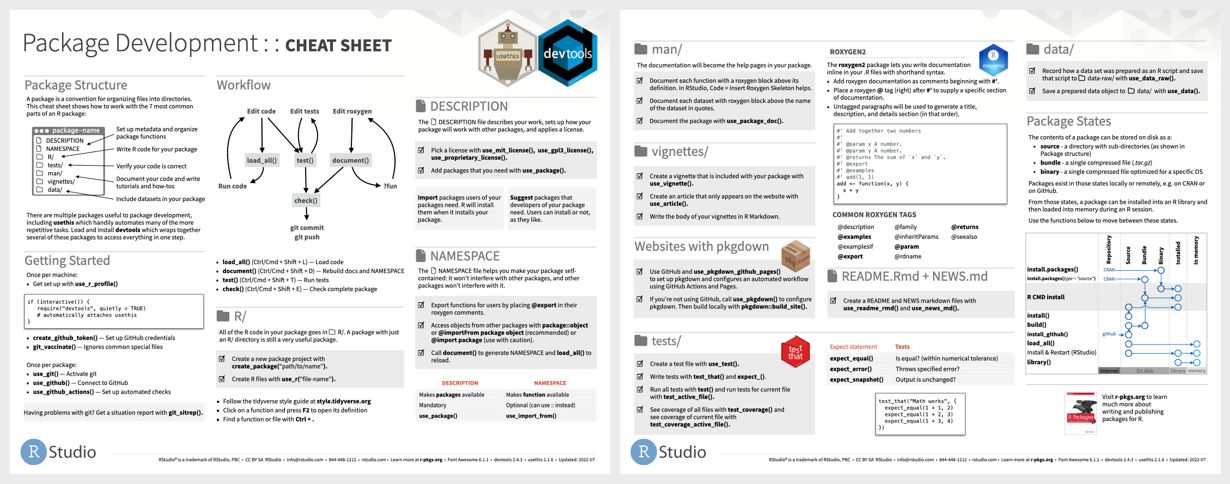
Key Functions
Why This Matters?
Each function:
- Sets up files with correct syntax
- Configures dependencies properly
- Follows CRAN requirements
- Uses community best practices
- Saves you from painful debugging later
Pro Tip: Set up your usethis options once!
Now every package inherits your preferences automatically!
📚 Resources: usethis.r-lib.org
# Start a new package
usethis::create_package("~/mypackage")

# Add essential infrastructure
usethis::use_mit_license()
usethis::use_readme_rmd()
usethis::use_github_action("check-standard")
usethis::use_testthat(3)
usethis::use_pkgdown()usethis::edit_r_profile()
# Add: options(usethis.full_name = "Your Name")
# options(usethis.protocol = "ssh")
devtools - Essential Development Workflow 🔧
Streamlines your package development workflow with key functions! ⚡
💡 Pro Tip: Use Ctrl/Cmd + Shift + L in RStudio to quickly run load_all()!
Use these functions to create an instant feedback loop
Why load_all() is Magic?
- It simulates installing your package WITHOUT actually installing it
- Changes appear instantly
- You can:
- Test functions immediately
- Try different approaches rapidly
- Keep your development flow uninterrupted
- Maintain state between iterations
The Check-Document-Test Loop
Hidden Gem
CRAN will reject packages for typos in documentation. Catch them locally first.
The Professional Flow
devtools eliminates friction from package development
📚 Resources: devtools.r-lib.org
devtools::load_all() # Instant - try your changes NOW
devtools::test() # Run tests without reinstalling
devtools::check() # Full CRAN checks locally
# Core workflow after you make changes to your code
devtools::load_all() # Load package to test immediately
devtools::document() # Generate/update documentation
devtools::test() # Run tests
devtools::check() # Run R CMD check for full validation
devtools::install() # Install package locally# Quick checks
devtools::missing_s3() # Find missing S3 methods
devtools::spell_check() # Check spelling# Keyboard shortcuts
`Ctrl/Cmd + Shift + L` -> (load_all) constantly
`Ctrl/Cmd + Shift + T` -> (test) after changes
`Ctrl/Cmd + Shift + D` -> (document) before commits
`Ctrl/Cmd + Shift + E` -> (check) before pushing
GitHub Actions with r-lib/actions - CI/CD Setup 🚀
Automates package testing across multiple platforms and R versions! 🔄
One Command Setup
💡 Pro Tip: The standard check runs on Windows, macOS, and Ubuntu with multiple R versions.
What Actually Happens?
When you push code:
- GH Actions spins up 3+ machines
- Installs R on each
- Installs your dependencies
- Runs R CMD check
- Reports results back
- All in ~5-10 minutes
- You get a ✅ or ❌ immediately.
The Three Essential Actions for testing, metrics, and documentation
Coverage Tracking: The test-coverage action pushes to codecov.io, giving you a badge showing % of code tested. This isn’t vanity - it identifies untested functions that need attention. Public accountability drives quality.
Documentation Automation: The pkgdown action rebuilds your website on every push. Docs are ALWAYS current. Users always see up-to-date documentation.
Before pushing to CRAN, you KNOW your package works everywhere. That ✅ on your commits means:
- No platform-specific bugs
- Tests pass on all versions
- Documentation builds
- Coverage is tracked
- CRAN submission becomes routine
📚 Resources: github.com/r-lib/actions
usethis::use_github_action("check-standard")usethis::use_github_action("check-standard") # Core testing
usethis::use_github_action("test-coverage") # Track coverage
usethis::use_github_action("pkgdown") # Auto-deploy docs
# Custom workflow example
- uses: r-lib/actions/setup-r@v2
  with:
    r-version: 'release'
use-public-rspm: truePackage Structure with pkgdown Site Generation 🌐
Creates beautiful documentation websites for your packages! ✨
Setup
💡 Pro Tip: Use usethis::use_pkgdown_github_pages() for automatic deployment.
What pkgdown Does?
It transforms your package into a professional website:
- Function reference (all your roxygen docs)
- Vignettes (your tutorials)
- README (your intro)
- Changelog (your NEWS.md)
- Search functionality
Better docs = more users = more feedback = better package
The Reference Page
pkgdown automatically:
- Groups related functions
- Shows usage examples
- Links between functions
- Highlights code with syntax colors
- Makes everything searchable
- Your roxygen comments become interactive documentation
Customization without code: Change colors, navigation, layout - all configuration, no HTML/CSS.
GitHub pages integration
Now every push automatically:
- Builds your site
- Deploys to GitHub Pages
- Updates documentation so docs are always current
Function grouping example
Organise hundreds of functions into logical groups. Users find what they need.
📚 Resources: pkgdown.r-lib.org
usethis::use_pkgdown()
pkgdown::build_site()
# _pkgdown.yml
template:
bootstrap: 5
navbar:
structure:
left: [intro, reference, articles, tutorials]
right: [search, github]usethis::use_github_action("pkgdown")reference:
- title: "Data manipulation"
contents:
- starts_with("filter")
- ends_with("_join")
- title: "Visualization"
contents:
- has_concept("plotting")
Adding dependencies to your R package 🧵
Adds to Imports section, alphabetically sorted, with correct formatting.
Using usethis
Version requirements matter: Your code uses features added in 1.14.0. Without min_version, users with old versions get cryptic errors. Specify requirements upfront.
Imports vs Suggests: Imports = must install. Suggests = nice to have. Keep Imports minimal.
Resources: usethis.r-lib.org
usethis::use_package("dplyr")usethis::use_package("data.table", min_version = "1.14.0")# Required for core functionality
usethis::use_package("dplyr")
# Optional - only for examples/vignettes
usethis::use_package("ggplot2", type = "Suggests")
roxygen2: Advanced Tags and Cross-References 📝
Documents using advanced roxygen2 features, with markdown-style writing! 🎯
Cross-references 🔗
Advanced tags: ⚡
💡 Pro Tip: Use @inheritDotParams to inherit parameter documentation.
Basic roxygen2
Cross-reference: Set clickable links so that users can navigate your documentation like a website.
Family tags to group related functions. pkgdown automatically creates “See also” sections grouping these together.
@inheritParams superpower: Update the parameter doc once, it propagates everywhere. DRY principle for documentation.
@inheritDotParams magic: All 94 parameters from theme() are now documented in your function. Without typing them.
@section tags for structure: These create collapsible sections in pkgdown. Organises complex documentation.
@eval tag for dynamic documentation: Generate documentation programmatically.
Markdown in roxygen2: Bold, italics, lists, code blocks - markdown makes docs readable.
📚 Resources: roxygen2.r-lib.org
#' @seealso [other_function()], [pkg::function()]
#' @family utility functions
#' @inheritParams parent_function
#' @param x A number
#' @return A result
#' @export#' @seealso [other_function()] for related functionality
#' @seealso [dplyr::filter()] for filtering#' @param data A data frame
#' @param col Column to use
parent_function <- function(data, col) {}
#' @inheritParams parent_function
child_function <- function(data, col, extra) {}#' @inheritDotParams ggplot2::theme
my_plot <- function(...) {
ggplot() + theme(...)
}#' @section Warning:
#' This function modifies data in place.
#'
#' @section Performance:
#' For large datasets, consider using data.table.#' `r paste("Last updated:", Sys.Date())`
#' `r document_examples_from_file("examples.R")`#' @description
#' This function processes data:
#' - **Fast**: O(n) complexity
#' - **Safe**: Validates inputs
#' - **Flexible**: Many options
covr - Test Coverage Reporting
Track how much of your code is tested. Use #nocov for code you don’t want to cover (like basic R functions etc)
Basic usage
Integration with CI: Badge on README, track over time.
Pro Tip: Aim for >80% coverage, but focus on testing critical functions thoroughly rather than chasing 100%.
See exactly which lines run during tests: Red = untested = risk.
The 80% Rule: Chase 100% coverage = test getters/setters pointlessly. Focus on: logic, edge cases, error handling. 80% meaningful coverage > 100% checkbox coverage.
Resources: covr.r-lib.org
covr::package_coverage()
covr::report()
covr::package_coverage() |>
  covr::zero_coverage()
usethis::use_github_action("test-coverage")
usethis::use_coverage() # Adds codecov badge
testthat 3rd Edition Features
Modern testing with the latest testthat features.
Setup: usethis::use_testthat(3)
Enables: snapshot testing, better error messages, cleaner setup/teardown. If you’re on edition 2, upgrade today.
New features
Helper functions in tests/testthat/helper.R
Pro Tip: Use test_that() with descriptive names that explain what should happen.
Snapshot tests: Captures exact output. Future changes show diffs. Catch unintended message changes.
Helper files: Put shared test code in tests/testthat/helper.R. Auto-loaded for all tests. setup.R runs before tests, teardown.R after. Clean, organised.
Descriptive test names
Resources: testthat.r-lib.org
# Snapshot tests
test_that("plot output is stable", {
  p <- my_plot(data)
  vdiffr::expect_doppelganger("basic-plot", p)
})test_that("error messages stay helpful", {
expect_snapshot(my_function(bad_input), error = TRUE)
})test_that("function handles missing values by imputing mean", {
# specific, readable
})
# Not: test_that("test1", {}). When tests fail, you know exactly what broke.
Snapshot Testing with testthat
Test complex outputs that are hard to specify exactly.
Pro Tip: Review snapshot changes carefully - they capture everything, including whitespace and formatting.
Snapshot solution: First run captures output to file. Future runs compare. Any difference = test fails.
Review changes carefully: Snapshots capture EVERYTHING - whitespace, formatting, exact wording. Intentional changes? Update snapshot. Unintentional? Fix your code.
Plot snapshots: Visual regression testing. Catch accidental plot changes.
test_that("error messages are informative", {
  expect_snapshot(my_function(bad_input), error = TRUE)
})test_that("plots look right", {
p <- ggplot(mtcars, aes(mpg, wt)) + geom_point()
vdiffr::expect_doppelganger("mtcars-scatter", p)
})Testing with mocks using testthat
Test functions that depend on external resources using testthat’s built-in mocking.
Local mocking
Mock with return values
Pro Tip: Use local_mocked_bindings() to mock functions within the test scope only.
Resources: testthat.r-lib.org
test_that("function handles API failure", {
  local_mocked_bindings(
    api_call = function(...) stop("API unavailable")
  )
  expect_error(my_function(), "API unavailable")
})test_that("function processes API response", {
local_mocked_bindings(
fetch_data = function(...) list(status = "success", data = mtcars)
)
result <- my_function()
expect_equal(nrow(result), 32)
})
vcr - Recording API calls for tests
Record real API responses for reliable, fast tests without hitting live APIs.
Setup
Record cassettes
For vignettes and examples
Pro Tip: Commit cassette files to git for reproducible tests across environments.
Record cassettes
How It Works?
First run hits real API, saves response to cassette file. Subsequent runs read from file. Tests are fast, reliable, work offline.
For Vignettes too: Vignettes with real API examples that rebuild anywhere, anytime. Use code chunk options to control.
Resources: docs.ropensci.org/vcr
library(vcr)
vcr_configure(dir = "tests/fixtures/vcr_cassettes")test_that("API returns expected data", {
use_cassette("github_api", {
response <- httr::GET("https://lnkd.in/ePSbTkEC")
expect_equal(httr::status_code(response), 200)
})
})# In vignette setup
vcr::use_cassette("demo_data", {
demo_data <- fetch_api_data("example")
})library(vcr)
vcr_configure(dir = "tests/_vcr")
test_that("API returns expected data", {
local_cassette("github_api", {
response <- httr::GET("https://api.github.com/users/octocat")
expect_equal(httr::status_code(response), 200)
})
})#| label: example-code
#| cassette: true
demo_data <- fetch_api_data("example")

Use linters!
Maintain consistent, readable code style automatically.
Setup
Usage
Pro Tip: Add both to pre-commit hooks for automatic code formatting.
Automate style: styler fixes, lintr finds. Run both, commit the result.
Configure once: Team agrees on rules once. Tools enforce forever.
IDE integration: RStudio: Addins menu. VSCode: R extension. Format on save. Never think about style again.
Resources: lintr.r-lib.org
# .lintr file in project root
linters: linters_with_defaults(
  line_length_linter(120),
  commented_code_linter = NULL
)rlintr::lint_package()
styler::style_pkg()rstyler::style_pkg() # Formats entire package
lintr::lint_package() # Finds style issues# .lintr file in project root
linters: linters_with_defaults(
line_length_linter(120),
commented_code_linter = NULL
)
goodpractice - Package Health Checks
Get comprehensive feedback on package quality.
Usage: goodpractice::gp()
Checks include: ⬩ Function length and complexity ⬩ Namespace usage ⬩ DESCRIPTION completeness ⬩ Code coverage ⬩ R CMD check results
Pro Tip: Run gp() before CRAN submission to catch common issues early.
Before CRAN Submission: Run gp() first. Fix warnings. CRAN submission goes smoother. Fewer rejections, faster acceptance.
Resources: goodpractice docs

Performance Testing with bench
Profile and benchmark your package functions.
Basic benchmarking
Memory profiling
Pro Tip: Include benchmarks in your test suite to catch performance regressions.
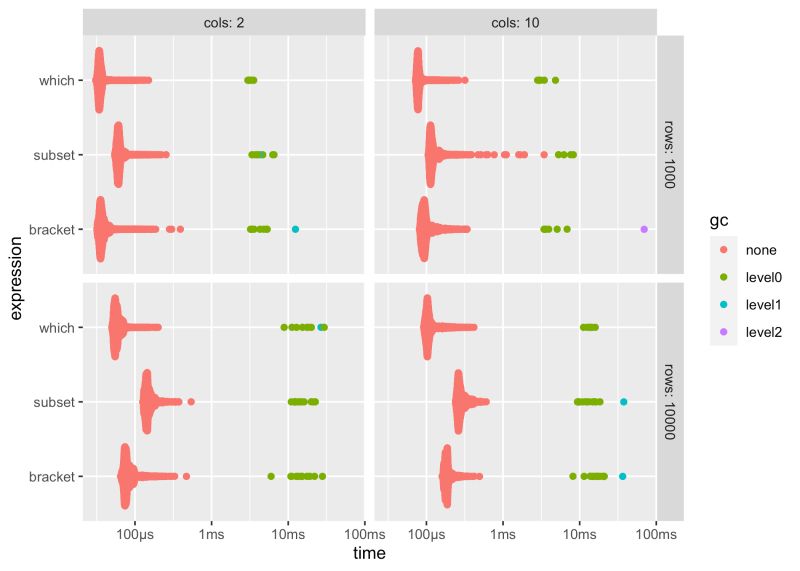
Performance question: “Is approach A faster than B?” Guessing = wrong. Microbenchmarking = proof.
Memory matters: Track memory allocation. Sometimes “faster” uses 10x memory. bench shows the tradeoff.
Catch regressions: Include benchmarks in tests. New code slower? Test fails. Maintain performance intentionally.
Resources: bench.r-lib.org
results <- bench::mark(
  old_approach = old_function(data),
  new_approach = new_function(data),
  check = FALSE, # Skip result equality check
  iterations = 100
  )
plot(results)bench::mark(
my_function(big_data),
filter_gc = FALSE
)bench::mark(
my_function(big_data),
filter_gc = FALSE
)
rhub - Multi-Platform Testing (Thread)
Test your package on multiple platforms before CRAN submission.
Run CRAN checks: Tests on Debian, Windows, Fedora. Same platforms CRAN uses. Catch platform-specific issues early.
Platform specific: Target specific platforms where you expect issues.
Before submission: Run rhub + GitHub Actions. If both pass, CRAN will likely accept.
Resources: r-hub.github.io/rhub
rhub::check_for_cran()rhub::check_on_windows()
rhub::check_on_macos()
rhub::check(platform = "debian-clang-devel", "fedora-gcc-devel")
rlang - Tidy Evaluation in Packages
Handle user expressions safely in package functions.
Basic tidy evaluation
Embrace operator
Dynamic dots
Pro Tip: Use {{ }} (embrace) for single arguments, ... for multiple arguments.
Resources: rlang.r-lib.org
my_summarise <- function(data, ...) {
  data |>
    dplyr::summarise(...)
    }
my_mutate <- function(data, col, value) {
data |>
dplyr::mutate({{ col }} := value)
}my_function <- function(...) {
dots <- rlang::list2(...)
# process dots
}